
You’re standing in your local dive shop, or scrolling an online retailer late at night, and you see two dive computers side by side. One costs $250. The other costs $1,600. Both perform the same fundamental job.
A dive computer is the piece of gear many divers think about least and rely on most. It tracks your depth, your time, your ascent rate, your nitrogen loading, your safety stops, and the line between the diving you can safely do and the diving that will hurt you. That core safety job, calculating your No Decompression Limit (NDL) to keep you safe underwater, is handled by the $250 computer just as reliably as the $1,600 one. The extra money buys capability: more gas options, air integration, a tunable algorithm, a clearer display, better logging. None of it is frills, but some of it won’t matter at all depending on the diving you actually do.
That’s what makes it easy to overspend on features you’ll never touch, or underbuy and replace the whole unit two years later. So I’ve broken the decision into five things to consider, to help you spend knowingly, whatever your budget, and find the computer that matches the diving you’re actually doing.
How a Dive Computer Works
Before the price tiers, it helps to know what you’re paying for. At its simplest, a dive computer continuously calculates the inert gas loading in your tissues based on your depth and time, and tells you how long you can stay before you’d need to make decompression stops on the way up. It replaces the dive tables most of us learn during the open water course and then never open again, doing the same job continuously and adjusting to your actual profile rather than a single plan you committed to on the surface.
It also logs. Every dive gets stored with its depth profile, water temperature, ascent rate warnings and gas mix, and most computers sync to a phone for a digital logbook. This matters more than beginners expect, especially once you start booking liveaboards or advanced courses that ask for a minimum number of logged dives.
A dive computer is essential gear. Just as you wouldn’t dive without a regulator, a mask or fins, you wouldn’t dive without your computer.
With those basics in mind, here are the five things to consider.
1. Price Tiers: Budget, Mid-Range, and High-End
Your budget is the easiest place to start narrowing things down. The market splits into three fairly distinct tiers.
Budget Dive Computer
250 to 500 USD. Simple monochrome displays, the core metrics, and user-replaceable batteries. Every modern computer in this tier handles nitrox up to 40%. The Suunto Zoop Novo, Cressi Leonardo, and Mares Puck Pro live here. These are entirely adequate for the diving most recreational divers will ever do. This is the tier for beginners, holiday divers, and anyone who just wants a reliable, no-frills tool.

Mid-range Dive Computer
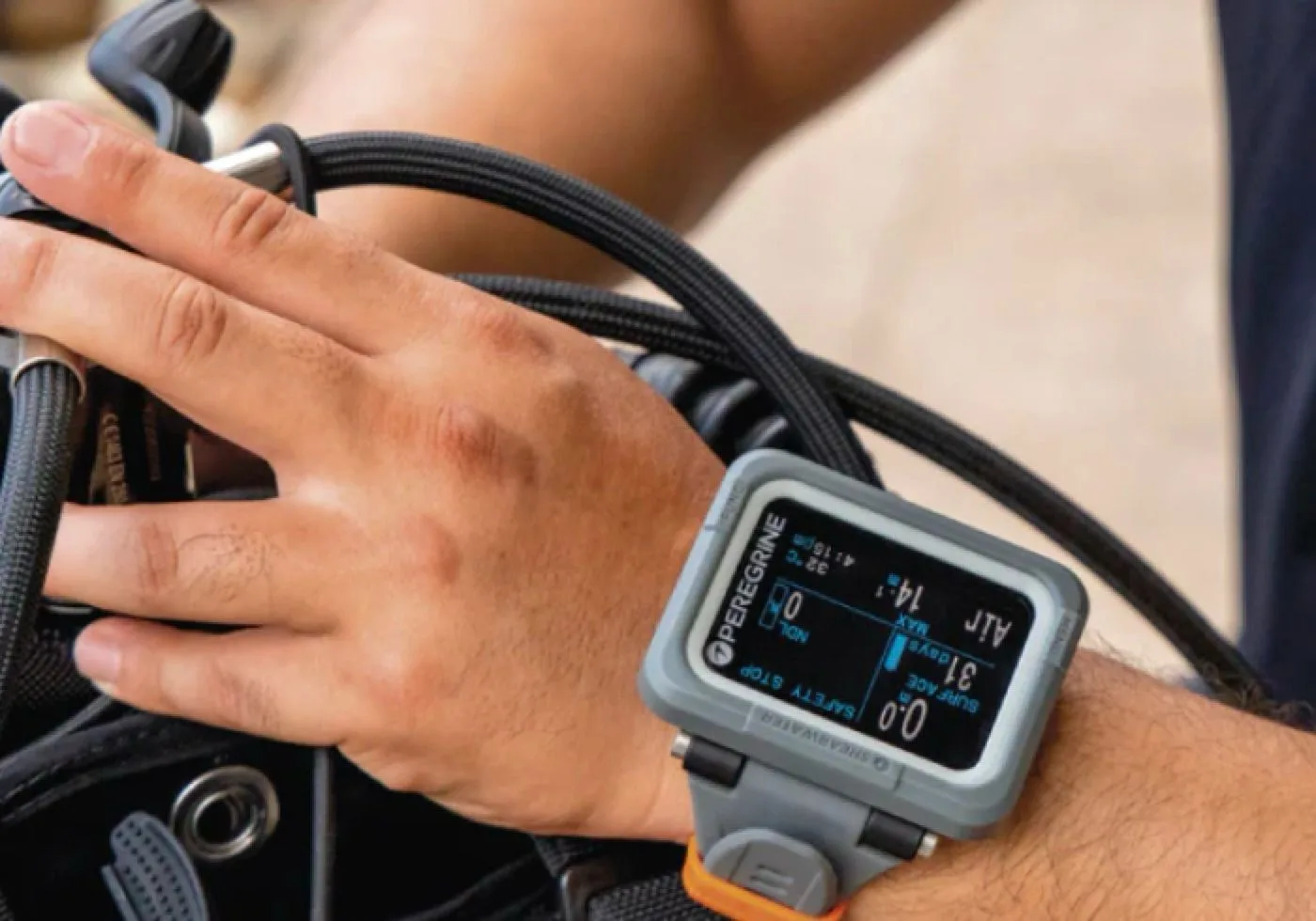
500 to 1,000 USD. Much better displays and nicer designs than the budget options, rechargeable batteries, digital compasses, gas integration capability, customisable conservatism, and entry-level technical modes. The Suunto D5 and Ocean, Garmin Descent G1 and G2, Shearwater Peregrine and Atmos Mission 3 sit in this band. This is where most divers who plan to keep diving for years end up, because it gives you room to grow without buying an expensive full technical rig.
Around 600 of my dives have been with an Atmos Mission 1 (their first model), and I’ve been pleased with it. It’s also one of the more affordable options that still offers great functionality and style.
High-end Dive Computer
1,000 USD and up. Vibrant screens, air integration, full technical and trimix capability, and extensive daily smartwatch features. The Shearwater Perdix, Teric, and Petrel are the dominant names, alongside the Garmin Descent Mk3 and X50i. These are aimed at serious technical divers, dive professionals or enthusiasts who want a single do-it-all device.

2. Dive Modes and Algorithms
You shouldn’t pay for modes you will never use. If you are strictly a recreational vacation diver, a computer offering advanced trimix or closed-circuit rebreather (CCR) modes is overkill, and you are paying for the privilege.
A more hidden factor is the decompression algorithm running under the hood. The two you will see most are:
Bühlmann ZH-L16 (with gradient factors). Considered the industry standard, used by most high-end and technical computers because it is highly customisable. You can manually adjust how conservative or aggressive you want the computer to be, which is exactly what you want once you understand your own diving.
RGBM (Reduced Gradient Bubble Model). Common in entry-level and proprietary computers. It tends to run naturally more conservative, which can shave a few minutes off your bottom time on repetitive or deep dives compared to a Bühlmann-based unit. For recreational diving in the first thousand dives, either is safe. What matters more is whether you can adjust the conservatism yourself, which brings us back to gradient factors.
3. Form Factor and Usability
Dive computers generally come in three body shapes.
The large “puck” style. Big, round, heavy-duty units, favoured by rental shops because they have large, readable text and sacrificial lenses that absorb every scratch. They tend to be bulky, and most use a basic monochrome LCD screen, the old-school kind with blocky digits and no colour, lit by a simple push-button backlight for low visibility. Another con is that you’ll only ever wear it while actively diving.
The watch style. Sleek and compact, designed to look like a normal wristwatch or smartwatch. The real benefit is that you can wear it on a regular basis, use it to fill out logbooks with your buddies, and keep it on every day, which means it is on your wrist when you need it.
The console style. Attached directly to the high-pressure hose on your first stage, alongside the SPG. Some shops use them so clients don’t lose them, but many divers dislike them because you have to physically reach down and grab the hose to check your data instead of just glancing at your wrist. That adds task loading on every check.
Most divers, given the choice, go for wrist. The newer compact wrist computers from Suunto, Shearwater, Atmos, and Garmin are comfortable enough to wear in and out of the water. Scuba brands like Aqualung, Scubapro, Mares and Cressi also have options.
Whichever shape you choose, the real test is how intuitive it is underwater while wearing thick neoprene gloves. Pay close attention to the buttons. Computers range from single-button navigation up to four or five buttons. A single-button computer sounds simple, but it is frustrating in practice, because you cycle the menus with short clicks and select with long holds, and if you miss the option you want you have to click all the way around again. A three or four-button layout gives you dedicated up, down, select, and back controls, and navigation gets far quicker.
One small thing that helps if you only dive a few times a year: you will forget how to drive a complicated menu between trips. Pick a computer that spells out full words rather than cryptic abbreviations, so you see “Dive Log” instead of “LGG” and have to guess what it means.

4. Screen Technology and Readability
If you struggle with your vision, or you dive in dark or murky water, screen tech matters immensely. This is also the criterion I got wrong on my own first computer.
Monochrome / LCD. Excellent for battery life, often two years on a coin cell, but it can be genuinely hard to read in blinding surface sunlight or in pitch-black night conditions without hitting the backlight. My first computer had one of these screens. It looked perfectly clear under the dive shop’s fluorescent lights, and then on my first proper low-visibility dive I found myself squinting at the NDL with my mask pressed almost against the screen. That was the dive that taught me to test readability before buying, not after.
AMOLED / colour displays. These look like a modern phone screen, vibrant and crisp, so you can read them at a glance in muddy water, in dark spaces, or under glaring sun. Most also have brightness settings so you can dim them right down for a night dive.
Whatever you are considering, hold it at arm’s length under bright light and try to read the no-decompression time at a glance. If it is hard now, it will be harder underwater.
5. The “Extra” Features: Luxury or Necessity
This is where the price climbs fast. Be honest with yourself about whether you actually need these.
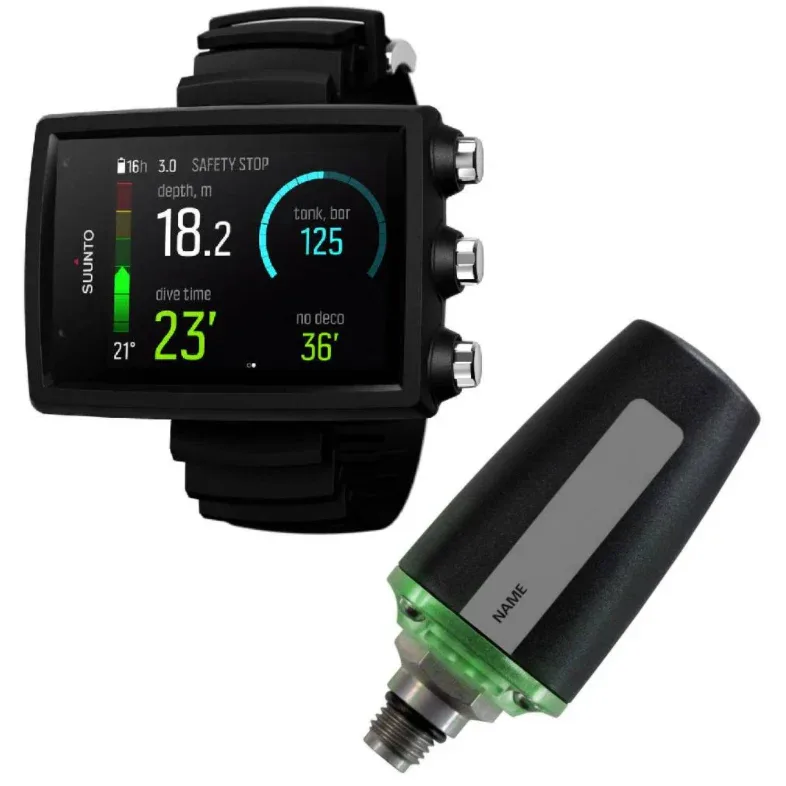
Air integration (AI). A wireless transmitter screws into your scuba regulator guide first stage and broadcasts tank pressure straight to your wrist. Beyond the convenience, AI computers calculate your remaining gas time, telling you how many minutes you have left at your current breathing rate and depth. It is a lovely thing to have, but the transmitter alone often adds 400 to 500 USD on top of the computer.
Digital compass. Lets you set a heading and its reciprocal directly on the screen, so you can turn 180 degrees and find your way back to the boat. Useful, though most divers use it less than they expect to. If you’re a dive professional you certainly want this feature so you don’t have to also carry a separate compass.
Advanced digital logbooks. High-end models sync over Bluetooth into polished phone apps with dive site maps, entry and exit GPS coordinates, and full graphic depth profiles.
Smartwatch functionality. The top-tier watches pull double duty with sport tracking, heart rate, sleep tracking, and contactless payments. The Garmin Descent series and Atmos Mission 3 are built around this idea: a daily-wear device that happens to also be a serious dive computer.
What Actually Matters
For a first dive computer, in order of importance:
A clear screen, readable at depth and with a wetsuit hood on. Many entry-level computers have screens that look fine in the dive shop and become difficult to read in low-visibility water. Take any computer you are considering, hold it at arm’s length under bright fluorescent light, and try to read the no-decompression time at a glance. If it is hard now, it will be harder underwater.
A logical interface. One-button computers save money but are painful when you need to change settings underwater or set up a complex dive plan. Two- or four-button interfaces are significantly more usable and worth the additional cost.
Conservatism settings you can adjust. The default settings on most computers are calibrated for a healthy adult in good condition. If you are diving frequently, recovering from illness, dehydrated, fatigued, or older, more conservative settings are appropriate. A computer that lets you adjust gradient factors or personal conservatism is significantly safer than one that does not.
Battery life and battery type. User-replaceable batteries are far cheaper to maintain than computers that require shop service. The exception is rechargeable lithium computers, which are convenient day-to-day but eventually require replacement of the entire unit when the battery degrades. Either approach works; both are better than computers that require expensive shop battery changes every few years.
Can I Use the Apple Watch Ultra as a Dive Computer?
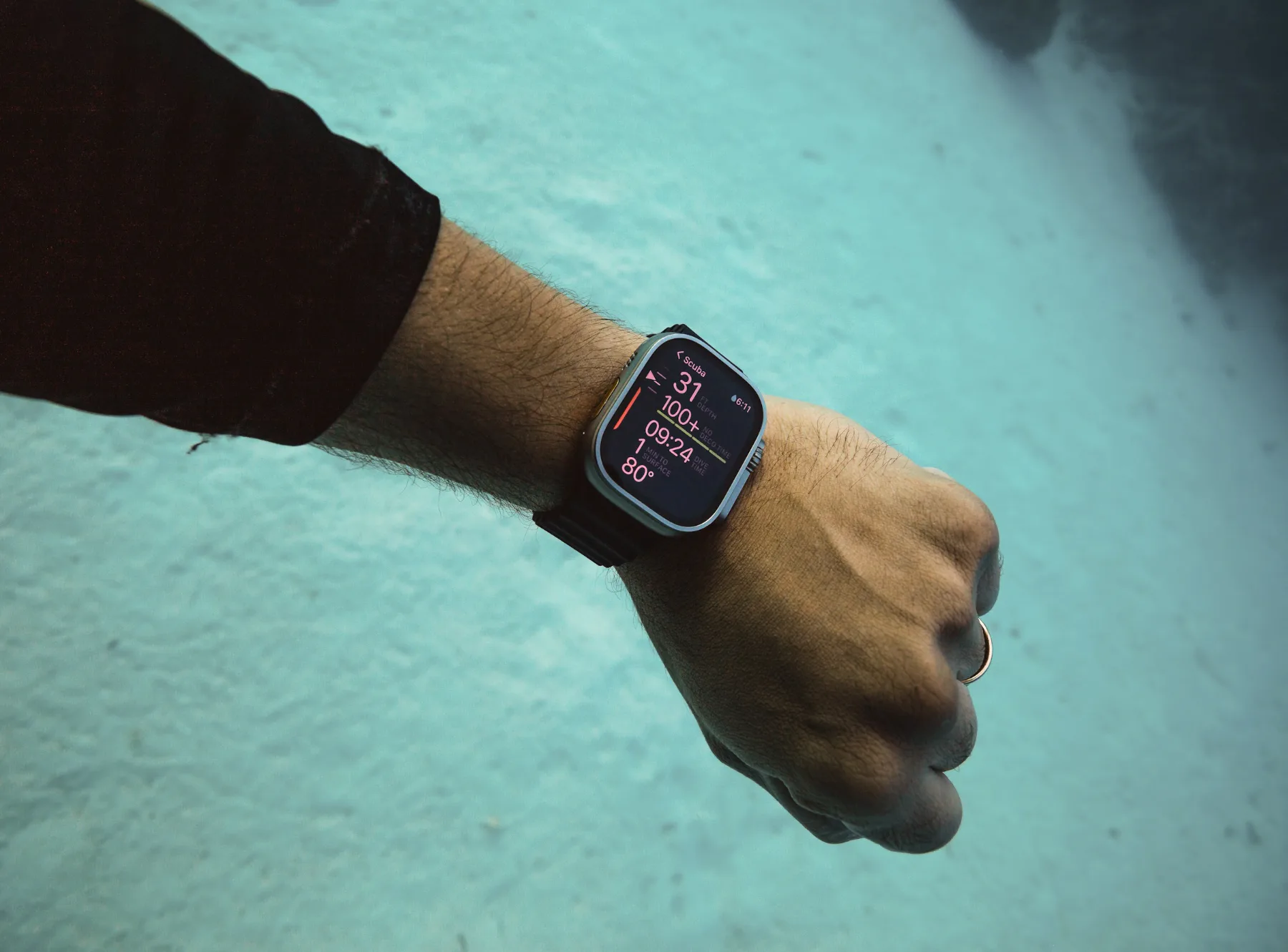
Apple added dive tracking to the Watch Ultra, and paired with the Oceanic+ app it does the basics: depth, time, ascent rate and your no-decompression limit, using a proper algorithm. The screen is bright and the alerts are hard to miss. But as of 2026 divers have found it isn’t something to fully rely on. It’s depth-limited to around 40 metres (which is fine for recreational divers), the touchscreen is useless underwater, and battery life is shared with everything else the watch does. The more serious issue is that some divers have had it silently stop recording mid-dive, or fail to start recording at all, which is a real safety concern in something you’re meant to trust underwater. It also lacks air integration, so you’ll still need a separate gauge on your tank, and the app requires a paid subscription on top of the watch, which is the most common complaint in user reviews.
If you’re going to use it, treat it as a backup, not your primary. If you already own one, it’s a fine second computer but it isn’t the thing to trust your life to on anything serious.
Final thoughts ⌚︎
Once you’ve weighed these five points, you’ll know what actually matters for the diving you do, and you can start looking at specific models with a clear head instead of a spec sheet headache. A dive computer is usually one of the biggest investments in your kit, so it deserves proper research before you commit. For a closer look at specific models, this video breaks down the details:
Whatever you choose, buy the computer for the diver you are now, with a little room for the diver you’re becoming. That’s spending knowingly.
For what to pair it with, see the scuba regulator guide and the BCD buying guide. And if you are building a full kit from scratch, the guide to buying your own scuba gear covers how the computer fits alongside the rest.
Find the computer that matches your diving, keep it within your budget, and spend the rest of your money on the most important thing, which is getting out there and diving!